
Table of Contents
- What Are WhatsApp Usernames?
- Why WhatsApp Introduced Usernames
- How WhatsApp Usernames Work
- How to Reserve and Create a WhatsApp Username
- WhatsApp Username Requirements
- Privacy Benefits of WhatsApp Usernames
- WhatsApp Usernames vs Phone Numbers
- Who Can Use WhatsApp Usernames?
WhatsApp has introduced one of its biggest privacy improvements in years, and it’s already generating plenty of conversation.
Instead of sharing your phone number with everyone you chat with, you can now reserve a WhatsApp username and, as the feature rolls out, use it as another way for people to connect with you.
This update is designed to make messaging more private, especially when interacting with new contacts, businesses, communities, or people you meet online.
If you’ve seen the new WhatsApp username feature but aren’t sure how it works, you’re in the right place.
This guide explains everything you need to know about WhatsApp Usernames, including how to reserve one, the privacy benefits, username requirements, availability, and how this update changes the way people connect on WhatsApp.
Key Takeaways
- WhatsApp usernames let people connect without immediately sharing a phone number.
- Usernames are unique and can only belong to one account.
- Usernames must follow WhatsApp’s naming rules.
- The feature is rolling out gradually worldwide.
- End-to-end encryption remains unchanged.
What Are WhatsApp Usernames?
WhatsApp Usernames are unique identifiers that allow people to connect with your WhatsApp account without first knowing your phone number.
Think of them as your digital identity on WhatsApp.
Instead of giving someone your personal number, you can simply share your username once the feature becomes available for messaging on your account.
The goal is simple: make conversations more private while keeping communication fast and secure.
Although your phone number still powers your WhatsApp account behind the scenes, usernames create a safer way to start conversations with new contacts.
Why WhatsApp Introduced Usernames
For years, one of WhatsApp’s biggest privacy limitations was the need to exchange phone numbers before starting a conversation.
That wasn’t always ideal.
Freelancers, entrepreneurs, online sellers, creators, community managers, and professionals often had to reveal their personal numbers just to answer a simple question.
The WhatsApp username update changes that.
By introducing usernames, Meta is giving users more control over their personal information while making WhatsApp feel more like other modern messaging platforms.
It’s a move that balances convenience with privacy.
How WhatsApp Usernames Work
The WhatsApp username feature is straightforward.
Every username is unique.
Once you reserve one, no one else can use that exact username.
When the feature becomes fully available for messaging, people will be able to search for or use your username to start a conversation without first asking for your phone number.
Behind the scenes, your account remains protected by WhatsApp’s existing end-to-end encryption, meaning usernames do not weaken the security of your chats.
Instead, they simply provide another way to identify and connect with your account.
Can Two People Have the Same Username?
No.
Each WhatsApp username is unique.
If someone has already reserved the username you want, you’ll need to choose another available option.
This prevents impersonation and helps users identify the correct account.
Do Usernames Replace Phone Numbers?
No.
Phone numbers are still required to create and verify a WhatsApp account.
Usernames simply provide another way for people to find and contact you.
Your phone number remains linked to your account, but usernames help reduce the need to share it with everyone.
How to Reserve and Create a WhatsApp Username
Meta has begun allowing users to reserve usernames while gradually expanding the feature worldwide.
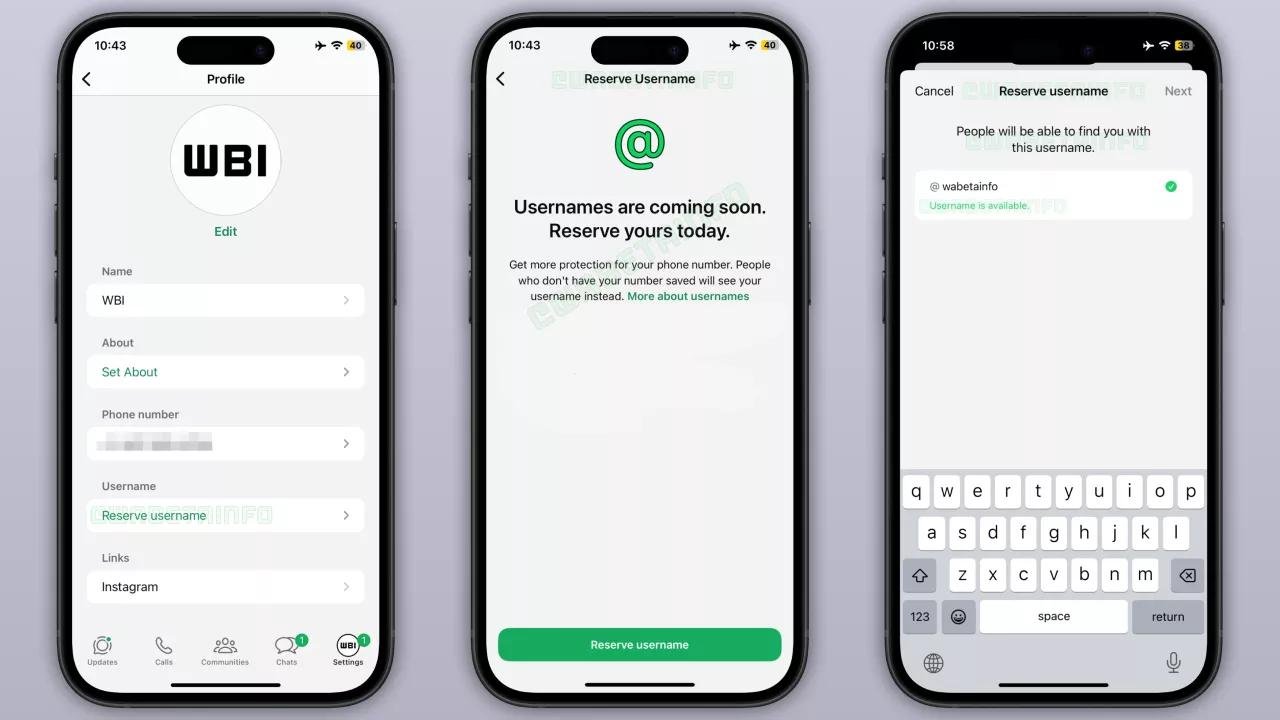
If your account has received the update, creating a username only takes a few minutes. Make sure you’re using thelatest version of WhatsApp from your device’s app store.
Step 1: Update WhatsApp
Make sure you’re using the latest version of WhatsApp from your device’s app store.
Always ensure you’re using the official app downloaded from trusted sources. Many new features arrive through app updates.
Step 2: Open Your Profile Settings
Launch WhatsApp.
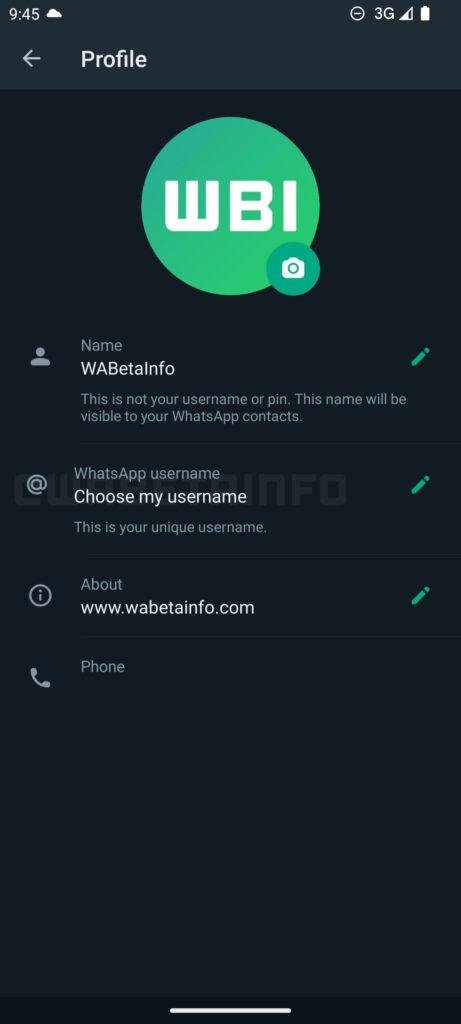
Go to Settings, then tap your profile.
If the feature is available, you’ll see the option to create or reserve a username.
Step 3: Choose Your Username
Enter your preferred username.
WhatsApp will automatically check whether it’s available.
If someone else already uses it, you’ll need to choose another variation.
Step 4: Confirm Your Username
Once your username meets WhatsApp’s requirements and is available, save it.
Your username is now reserved for your account.
As the rollout continues, it will become another way for people to connect with you.
WhatsApp Username Requirements
To keep usernames secure and easy to identify, WhatsApp applies several rules.
Your username generally must:
- Be unique.
- Contain between 3 and 35 characters.
- Start with a letter.
- Include only supported letters, numbers, periods, and underscores.
- Not end with a domain such as “.com”.
- Not begin with “www.”.
- Avoid misleading or impersonating another person or brand.
If your first choice isn’t available, try adding initials, numbers, or a simple variation that still represents your identity.
Choosing a memorable username makes it easier for friends, customers, and colleagues to find you.
Privacy Benefits of WhatsApp Usernames
The biggest advantage of WhatsApp Usernames is privacy.
For years, starting a conversation on WhatsApp meant giving away your personal phone number.
While this worked well for friends and family, it wasn’t always ideal when chatting with someone for the first time.
Whether you’re buying or selling online, networking at an event, running a business, or joining a new community, sharing your number can sometimes feel unnecessary.
With WhatsApp usernames, you have another option.
Instead of sending your phone number, you can simply share your username. This small change gives you greater control over who has access to your personal contact details.
Protect Your Phone Number
One of the most searched questions is, “Can I use WhatsApp without sharing my phone number?”
The answer is both yes and no.
Your phone number is still required to register and verify your WhatsApp account.
However, once the username feature is available to you, you won’t always need to share that number with people you want to chat with.
This significantly improves WhatsApp phone number privacy, especially when interacting with people you don’t know personally.
Better for Businesses and Professionals
The new username system is especially useful for:
- Small business owners
- Freelancers
- Consultants
- Online sellers
- Customer support teams
- Content creators
- Community managers
- Event organizers
Instead of publishing a personal mobile number on websites or social media, users can share a WhatsApp username instead.
This creates a more professional experience while reducing unwanted calls or spam.
RECOMMENDED: Coupang Data Breach: What It Means for Online Security in 2026
Safer Conversations
Imagine meeting someone through an online marketplace.
Previously, you had to exchange phone numbers before chatting.
With usernames, you can begin the conversation without immediately revealing your personal contact details.
It’s a simple change that offers an extra layer of confidence when connecting with new people.
End-to-End Encryption Still Protects Your Chats
A common misconception is that usernames change WhatsApp’s security.
They don’t.
Every conversation continues to be protected by end-to-end encryption, which means only you and the person you’re chatting with can read your messages.
Usernames change how people find you, not how your messages are protected.
Who Can Use WhatsApp Usernames?
One of the biggest questions people are asking is:
“Are WhatsApp usernames available to everyone?”
Not yet.
Meta has begun rolling out the feature gradually, starting with the ability for eligible users to reserve a username.
Like many major WhatsApp updates, availability depends on several factors, including:
- Your device
- Your WhatsApp version
- Your account
- The region where the feature is being released
If you don’t see the option today, it doesn’t necessarily mean something is wrong.
WhatsApp regularly introduces new features in phases to ensure stability before making them available worldwide.
How to Check if the Feature Is Available
To see whether your account has access:
- Update WhatsApp to the latest version.
- Open Settings.
- Tap your profile.
- Look for the Username option.
If it isn’t there yet, you’ll simply need to wait for the rollout to reach your account.
WhatsApp Usernames vs Phone Numbers
Many users assume usernames will replace phone numbers entirely. That’s not the case.
Instead, both work together.
| Feature | WhatsApp Username | Phone Number |
|---|---|---|
| Used to sign in | ❌ | ✅ |
| Required for account verification | ❌ | ✅ |
| Can be shared publicly | ✅ | Usually not recommended |
| Helps protect privacy | ✅ | ❌ |
| Used to start conversations | ✅ (as the rollout expands) | ✅ |
Think of your phone number as the foundation of your account, while your username becomes the public identity you choose to share.
Why This Update Matters
The introduction of WhatsApp Usernames is more than just another feature. It reflects a broader shift toward giving users greater control over their digital identity.
Other messaging platforms have long allowed people to connect through usernames.
Now, WhatsApp is bringing that convenience while maintaining the privacy and security standards that have made it one of the world’s most trusted messaging apps.
For individuals, it means fewer situations where personal phone numbers need to be shared.
For businesses, it creates a more professional way to communicate with customers.
For everyone, it adds another layer of privacy without changing the familiar WhatsApp experience.
Conclusion
The WhatsApp Usernames feature is one of the most significant WhatsApp privacy updates in recent years.
By allowing users to reserve a unique username, WhatsApp is making it easier to connect with others while reducing the need to share personal phone numbers.
Although the feature is still rolling out globally, it’s clear that usernames will play an important role in the future of messaging on the platform.
If you haven’t received the update yet, keep your app updated and watch for the new username option in your profile settings.
As Meta continues expanding the rollout, more users will gain access to a safer and more flexible way to communicate.