
Top AI Tools 2026 are transforming how people work, learn, create, and solve problems every day. From writing emails and generating images to coding software and analyzing business data, today’s AI tools help individuals and businesses accomplish more in less time.
The challenge in 2026 isn’t finding an AI tool, it’s choosing the right one.
Hundreds of AI platforms compete for attention, each promising to boost productivity or unlock creativity. While many are impressive, only a handful consistently deliver reliable performance, practical features, and good value.
Whether you’re a student looking for a smarter study assistant, a business owner automating workflows, a developer writing code, or a content creator producing videos and graphics, the right AI tool can save time and improve the quality of your work.
This guide to the Top AI Tools 2026 compares the 10 best AI apps for productivity, writing, coding, design, research, and business to help you choose the right solution.
Why AI Tools Matter More Than Ever in 2026
The Top AI Tools 2026 are helping businesses automate repetitive work, improve customer experiences, and make faster decisions with artificial intelligence.
Today, businesses use AI tools for productivity to automate repetitive tasks, analyze customer data, draft reports, and improve customer service.
Students rely on AI to summarize textbooks, explain difficult concepts, and organize research. Developers use AI coding assistants to speed up software development, designers generate professional visuals in minutes using AI image generators, and content creators produce blog posts, videos, podcasts, and social media campaigns faster than ever before.
As AI models become more capable and accessible, learning how to use them effectively is becoming just as valuable as learning traditional software.
RECOMMENDED: Top 10 Real Estate Companies in Enugu (2026): Best Property Developers for Land, Housing & Smart Investments
Businesses and individuals are increasingly relying on the Top AI Tools 2026 to automate tasks, improve productivity, and stay competitive in a rapidly evolving digital landscape.
How We Chose the Best AI Tools
Every platform included in the Top AI Tools 2026 list was evaluated for usability, reliability, pricing, innovation, and long-term value. We didn’t rank these tools based on popularity alone.
Each recommendation is based on hands-on usability, feature depth, pricing, reliability, update frequency, and how well the tool solves real-world problems.
We also considered:
- Ease of use for beginners
- Advanced features for professionals
- Value offered by free plans
- Integration with other software
- Community adoption
- Performance consistency
- Overall value for money
The result is a list of AI tools that are genuinely useful—not just trending.
Top AI Tools 2026: 10 Best AI Apps for Productivity
The Top AI Tools 2026 offer powerful solutions for writing, coding, design, business, education, and research. Below are the ten AI platforms that stand out in 2026.
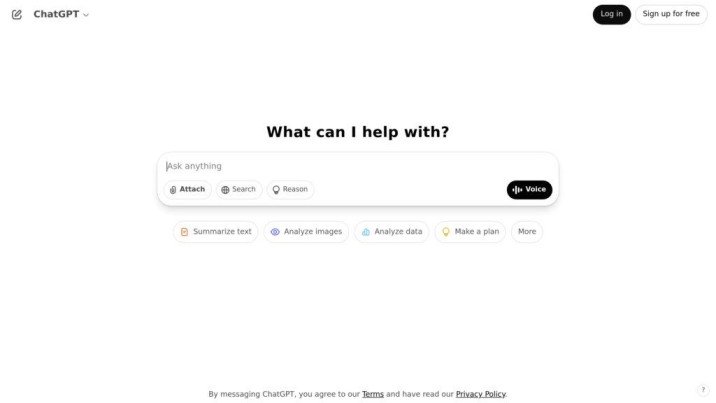
1. ChatGPT
ChatGPT leads the Top AI Tools 2026 rankings because of its versatility across writing, coding, research, and productivity. It combines writing, research, coding, brainstorming, document analysis, image generation, and automation into one platform, making it one of the most versatile AI assistants available.
Unlike many AI tools that specialize in a single task, ChatGPT adapts to different workflows. Whether you’re drafting a business proposal, generating blog ideas, debugging code, or summarizing lengthy reports, it consistently delivers high-quality results.
ChatGPT helps users write, edit, research, code, brainstorm ideas, analyze files, create images, and automate everyday tasks through natural conversation.
Key Features
- Advanced conversational AI
- AI writing assistant
- Image generation
- Coding assistance
- Document and PDF analysis
- Voice conversations
- Custom GPTs
- Workflow automation
Pricing
- Free plan available
- Paid plans start at approximately $20/month, depending on the subscription and region. Pricing may change, so check the official website for the latest details.
Pros
- Extremely versatile
- Excellent writing quality
- Strong coding support
- Beginner-friendly
- Frequent feature updates
- Available on web and mobile
Cons
- Advanced features require a paid subscription
- AI-generated responses should still be reviewed for specialized or high-stakes work
Best Use Cases
- Writing blog posts
- Content marketing
- Email drafting
- Brainstorming
- Programming
- Research
- Business planning
- Customer support
Best For
Writers, students, marketers, entrepreneurs, developers, educators, and professionals.
2. Google Gemini
Google Gemini has earned its place among the Top AI Tools 2026 thanks to its seamless integration with Google Workspace. Its biggest advantage is seamless integration with Google’s ecosystem.
Instead of copying information between different applications, Gemini can help draft emails, summarize documents, create presentations, analyze spreadsheets, and answer complex questions without disrupting your workflow.
RECOMMENDED: Inside the Race for the World’s Fastest Internet: From Fiber to Satellite Networks
Gemini also excels at multimodal AI, allowing users to work with text, images, files, and code within a single conversation.
Google Gemini is an AI assistant designed to help with writing, research, coding, brainstorming, document analysis, and productivity across Google’s services.
Key Features
- Google Workspace integration
- AI-powered writing assistant
- Advanced research capabilities
- Image and document understanding
- Coding assistance
- Presentation generation
- Spreadsheet analysis
- Real-time collaboration
Pricing
- Free version available
- Premium plans start from approximately $20/month, depending on your region and selected plan. Check Google’s official pricing for the latest information.
Pros
- Excellent research capabilities
- Seamless integration with Google Workspace
- Fast and accurate responses
- Supports multiple content formats
- Beginner-friendly interface
Cons
- Some premium AI features require a subscription
- Best experience comes when using Google’s ecosystem
Best Use Cases
- Academic research
- Business reports
- Email writing
- Presentation creation
- Spreadsheet analysis
- Team collaboration
Best For
Students, researchers, educators, business professionals, and Google Workspace users.
3. Claude AI
Claude AI has earned a reputation for producing thoughtful, well-structured responses that require minimal editing. It shines when handling lengthy documents, making it a favorite among researchers, consultants, lawyers, and professional writers.
Instead of focusing on speed alone, Claude prioritizes clarity, logical reasoning, and context, making it one of the best AI tools 2026 offers for deep analytical work.
Claude AI helps users write long-form content, summarize reports, analyze documents, brainstorm ideas, review files, and solve complex problems.
Key Features
- Large context window
- Long document analysis
- AI writing assistant
- Coding support
- File uploads
- Natural conversations
- Detailed summaries
Pricing
- Free version available
- Claude Pro starts from approximately $20/month, with pricing subject to change.
Pros
- Excellent writing quality
- Strong reasoning abilities
- Outstanding document handling
- Produces organized responses
- Easy to use
Cons
- Fewer integrations than some competitors
- Advanced features require a subscription
Best Use Cases
- Research papers
- Business reports
- Legal documents
- Policy analysis
- Technical documentation
- Long-form articles
Best For
Researchers, analysts, consultants, educators, legal professionals, and writers.
4. Microsoft Copilot
Microsoft Copilot is designed for professionals who spend their day inside Word, Excel, Outlook, PowerPoint, and Teams. Rather than replacing these familiar applications, it enhances them with AI-powered assistance.
Copilot can draft reports, summarize meetings, analyze spreadsheets, generate presentations, and automate repetitive office tasks, helping teams work more efficiently.
Microsoft Copilot brings AI directly into Microsoft 365, assisting users with writing, presentations, spreadsheets, email management, and collaboration.
Key Features
- Microsoft 365 integration
- AI-powered Excel analysis
- PowerPoint presentation creation
- Outlook email drafting
- Teams meeting summaries
- Enterprise-grade security
- Workflow automation
Pricing
- Limited free access
- Full features available through Microsoft 365 and Copilot subscription plans. Pricing varies depending on personal or business plans.
Pros
- Excellent for workplace productivity
- Saves time on repetitive office tasks
- Strong security and compliance features
- Ideal for enterprise environments
Cons
- Premium features require Microsoft subscriptions
- Less useful if you don’t use Microsoft 365
Best Use Cases
- Business reporting
- Financial analysis
- Email management
- Presentation design
- Meeting summaries
- Team collaboration
Best For
Businesses, corporate teams, project managers, finance professionals, and office workers
5. GitHub Copilot
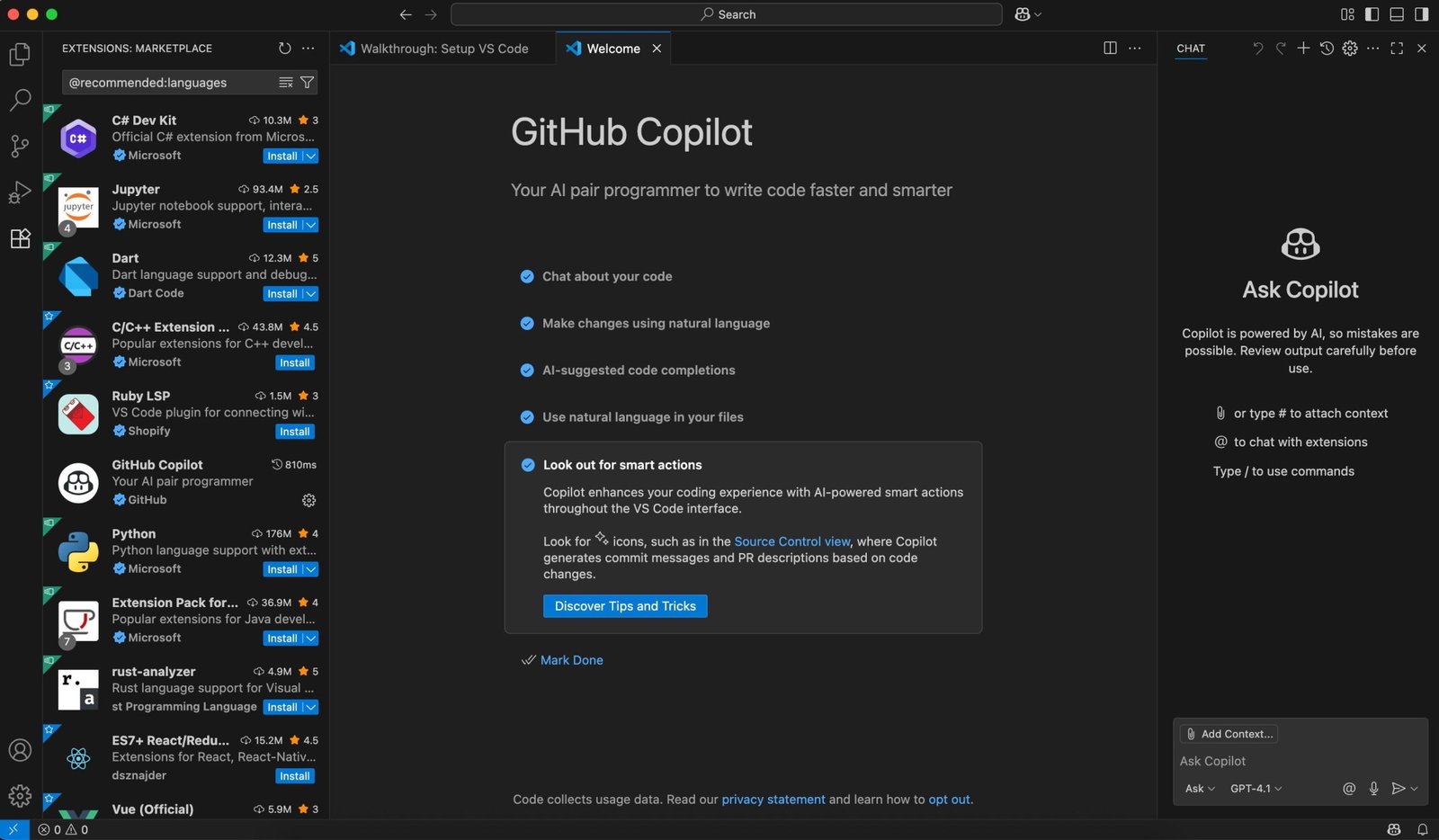
GitHub Copilot continues to lead the market for AI coding assistants by helping developers write cleaner code faster. It integrates directly into popular code editors, suggesting functions, completing code, and assisting with debugging in real time.
Instead of replacing developers, Copilot acts like an experienced programming partner that speeds up repetitive coding tasks and helps reduce development time.
GitHub Copilot assists developers by generating code, completing functions, explaining code, suggesting improvements, and supporting multiple programming languages.
Key Features
- AI code completion
- Function generation
- Code explanation
- Bug detection assistance
- Multi-language support
- IDE integration
- Documentation generation
Pricing
- Free for verified students, teachers, and eligible open-source contributors
- Paid plans available for individuals and businesses, with pricing varying by subscription.
Pros
- Significantly speeds up development
- Supports dozens of programming languages
- Reduces repetitive coding
- Integrates with leading IDEs
- Improves developer productivity
Cons
- AI-generated code should always be reviewed
- Most users will need a paid subscription
Best Use Cases
- Software development
- Web development
- Mobile applications
- API development
- Learning programming
- Debugging
Best For
Software engineers, developers, computer science students, startups, and engineering teams.
6. Midjourney
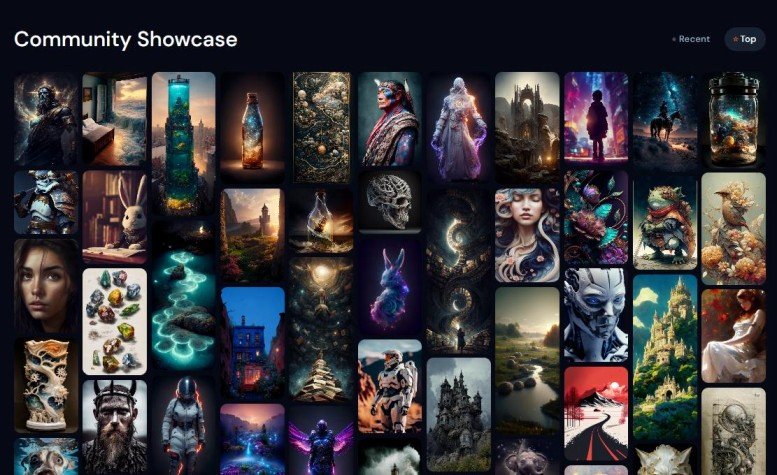
Midjourney remains one of the most impressive AI image generators available in 2026. It has earned a loyal following among artists, designers, marketers, and creative professionals thanks to its ability to produce visually stunning images from simple text prompts.
Whether you’re creating book covers, product concepts, social media graphics, website illustrations, or digital art, Midjourney consistently delivers high-quality results with remarkable detail and style.
Midjourney converts text prompts into high-resolution AI-generated images, illustrations, concept art, and realistic visuals.
Key Features
- High-quality AI artwork
- Photorealistic image generation
- Multiple artistic styles
- Prompt customization
- Image variations
- Commercial usage options
- High-resolution downloads
Pricing
- No permanent free plan
- Paid plans start from approximately $10/month, with higher tiers offering faster generation and additional features. Pricing may change over time.
Pros
- Outstanding image quality
- Excellent artistic creativity
- Fast image generation
- Strong community support
- Ideal for professional projects
Cons
- No free plan
- Learning effective prompts takes practice
Best Use Cases
- Digital artwork
- Marketing campaigns
- Product mockups
- Website graphics
- Book covers
- Advertising creatives
- Brand identity concepts
Best For
Graphic designers, artists, agencies, marketers, and content creators.
7. Adobe Firefly
Adobe Firefly extends the power of generative AI across Photoshop, Illustrator, Adobe Express, and other Creative Cloud applications. It is especially valuable for professionals who need commercially safe AI-generated assets for client work.
Its integration with Adobe’s creative tools means you can generate, edit, and refine content without leaving your design workflow.
Adobe Firefly creates AI-generated images, text effects, vectors, and design assets while integrating seamlessly with Adobe Creative Cloud.
Key Features
- AI image generation
- Generative Fill
- AI text effects
- Vector recoloring
- Photoshop integration
- Commercially friendly content
- Creative Cloud synchronization
Pricing
- Free monthly AI credits available
- Additional usage included with many Creative Cloud subscriptions. Premium plans vary by region and subscription.
Pros
- Professional-quality output
- Excellent Adobe integration
- Commercially safe AI models
- Easy to edit generated content
- Ideal for creative professionals
Cons
- Premium features require a Creative Cloud subscription
- Free AI credits are limited
Best Use Cases
- Graphic design
- Brand identity
- Marketing materials
- Product packaging
- Social media graphics
- Advertising campaigns
Best For
Professional designers, agencies, marketing teams, and businesses.
8. Canva Magic Studio
Canva has evolved into much more than a graphic design platform. With Magic Studio, it now offers an all-in-one AI workspace for creating presentations, social media graphics, videos, documents, websites, and marketing materials.
Its simple interface makes it one of the easiest AI tools for content creators and small businesses.
Canva Magic Studio helps users generate written content, presentations, videos, images, and designs using built-in AI features.
Key Features
- Magic Write
- AI image generator
- Presentation creator
- Video editor
- Background remover
- Brand Kit
- Thousands of templates
- Team collaboration
Pricing
- Free version available
- Canva Pro starts from approximately $15/month, depending on your region and billing cycle.
Pros
- Extremely beginner-friendly
- Comprehensive design platform
- Large template library
- Excellent collaboration features
- Great value for creators
Cons
- Advanced AI tools require Canva Pro
- Less customization than professional design software
Best Use Cases
- Social media posts
- Business presentations
- Marketing materials
- YouTube thumbnails
- Flyers
- Infographics
- Promotional videos
Best For
Small businesses, educators, freelancers, entrepreneurs, marketers, and content creators.
9. Notion AI
Notion AI combines note-taking, project management, documentation, and artificial intelligence into a single workspace. Instead of juggling multiple productivity apps, users can organize tasks, generate content, summarize meetings, and collaborate with teammates in one place.
This makes it one of the best AI productivity apps for individuals and teams.
Notion AI assists with writing, summarizing notes, organizing projects, brainstorming ideas, managing knowledge bases, and improving team collaboration.
Key Features
- AI writing assistant
- Meeting summaries
- Project planning
- Knowledge management
- Task organization
- Team collaboration
- Workflow templates
Pricing
- Free plan available
- AI features are included with selected paid plans or available as an add-on, depending on the subscription.
Pros
- Excellent organization tools
- Clean and modern interface
- Great collaboration features
- Flexible workspace
- Saves time on documentation
Cons
- AI features may require an additional subscription
- Can take time to learn all its capabilities
Best Use Cases
- Project management
- Business documentation
- Meeting notes
- Personal organization
- Team knowledge bases
Best For
Businesses, startups, students, remote teams, entrepreneurs, and project managers.
RECOMMENDED: Where To Visit On Vacation In Nigeria
10. Perplexity AI
Perplexity AI has quickly become one of the most trusted AI-powered search tools in 2026. Unlike traditional search engines that return pages of links, Perplexity provides direct answers while citing the sources it used, making it easier to verify information.
This approach saves time and makes it especially valuable for students, researchers, journalists, and professionals who need accurate, well-supported information.
Perplexity AI combines conversational AI with real-time web search to answer questions, summarize information, analyze files, and provide cited sources for further reading.
Key Features
- AI-powered search engine
- Source citations
- Real-time web information
- File uploads and analysis
- Follow-up questions
- Research-focused interface
- Multiple AI model options
Pricing
- Free plan available
- Perplexity Pro starts from approximately $20/month, depending on your region. Pricing may change, so check the official website for the latest information.
Pros
- Excellent for research
- Transparent source citations
- Fast and accurate answers
- User-friendly interface
- Great for fact-checking
Cons
- Less suited for creative writing than dedicated AI assistants
- Some advanced models require a Pro subscription
Best Use Cases
- Academic research
- Market research
- Fact-checking
- News analysis
- Business intelligence
- Everyday learning
Best For
Students, researchers, journalists, analysts, professionals, and curious learners.
Comparison Table: Top AI Tools in 2026
The Top AI Tools 2026 comparison table below highlights the Top AI Tools 2026 based on pricing, features, free plans, supported platforms, and the users they are best suited for.
| AI Tool | Best For | Free Plan | Starting Price* | Platform |
|---|---|---|---|---|
| ChatGPT | Writing, research, coding | ✅ | From ~$20/month | Web, Windows, macOS, Android, iOS |
| Google Gemini | Productivity & Workspace | ✅ | From ~$20/month | Web, Android, iOS |
| Claude AI | Long-form writing | ✅ | From ~$20/month | Web, Android, iOS |
| Microsoft Copilot | Office productivity | Limited | Varies by Microsoft plan | Windows, Web, Mobile |
| GitHub Copilot | Coding | Limited | From ~$10/month | VS Code and supported IDEs |
| Midjourney | AI image generation | ❌ | From ~$10/month | Web |
| Adobe Firefly | Professional design | Limited | Included with eligible Adobe plans | Web, Adobe Creative Cloud |
| Canva Magic Studio | Graphic design | ✅ | From ~$15/month | Web, Android, iOS |
| Notion AI | Productivity | Limited | Varies by plan | Web, Desktop, Mobile |
| Perplexity AI | AI search & research | ✅ | From ~$20/month | Web, Android, iOS |
How to Choose the Right Top AI Tools 2026 for Your Needs
Selecting the Top AI Tools 2026 ultimately depends on your daily workflow, budget, and professional goals. Rather than installing every AI platform available, focus on the Top AI Tools 2026 that solve your biggest productivity challenges.
Choose Based on Your Goals
- Writing and Blogging: ChatGPT or Claude AI
- Research and Learning: Perplexity AI or Google Gemini
- Programming: GitHub Copilot
- Graphic Design: Midjourney or Adobe Firefly
- Content Creation: Canva Magic Studio
- Office Work: Microsoft Copilot
- Project Management: Notion AI
Choose Based on Your Budget
If you’re new to AI, start with tools that offer generous free plans such as ChatGPT, Google Gemini, Canva Magic Studio, Claude AI, or Perplexity AI.
As your needs grow, consider upgrading only if premium features provide real value for your workflow.
Choose Based on Your Workflow
The most effective AI tools integrate seamlessly into your daily routine.
For example:
- If you already use Google Workspace, Gemini is a natural fit.
- If your work revolves around Microsoft 365, Copilot offers the smoothest experience.
- Designers using Adobe Creative Cloud will benefit most from Firefly.
- Developers working in Visual Studio Code or JetBrains IDEs will gain the most from GitHub Copilot.
Choosing a tool that fits your existing workflow minimizes disruption and maximizes productivity.
As competition continues to grow, the Top AI Tools 2026 will keep evolving with smarter features, better integrations, and more affordable pricing for individuals and businesses alike.
Conclusion
The Top AI Tools 2026 have transformed how people work, learn, and create. The best AI tools in 2026 are no longer just experimental technologies, they’re practical assistants that help millions of people save time, automate repetitive tasks, and produce better results.
If you want one AI assistant that can handle writing, brainstorming, coding, research, and everyday productivity, ChatGPT remains the strongest all-around choice.
For users deeply invested in Google’s ecosystem, Google Gemini offers seamless integration with Workspace. Claude AI excels at thoughtful writing and document analysis, while GitHub Copilot continues to lead the way for software development.
Creative professionals will appreciate Midjourney for AI-generated artwork and Adobe Firefly for commercial design projects.
Canva Magic Studio is an excellent option for creators and small businesses that need fast, professional-looking content. Meanwhile, Perplexity AI stands out for research and fact-checking thanks to its source-backed answers.
Rather than trying every AI platform available, start with one or two that align with your goals. As your needs evolve, you can expand your toolkit with specialized solutions that complement your workflow.
Whether you’re a student, developer, marketer, entrepreneur, or business owner, the Top AI Tools 2026 can help you work smarter, save valuable time, and achieve better results.
Choosing the right platform from the Top AI Tools 2026 list will put you in a stronger position to stay productive and competitive throughout 2026 and beyond.